![kudurrustone-logo.png]](https://kb.kudurrustone.com/hs-fs/hubfs/kudurrustone-logo.png?height=40&name=kudurrustone-logo.png)
This article assume you are comfortable with the overall layout of the Quote Dashboard and understand how to access that. For more information, see our Quote Dashboard - Overview article.
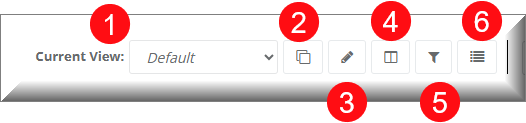
From the View Management area you can manage your views that the Quote Dashboard will take with predefined Filters and Columns. You can manage what filters are shown, what columns are shown and the order of those columns.
- This dropdown lists your available views. You start off with a default view that is read only. When you select a view from this dropdown your filters will update as well as the columns in the Quote data area.
- This button will create a copy of the currently selected View. When creating a copy you can set whether your entire company can see and edit that view.
- This button will allow you to edit the currently selected View. You can change the name and whether your entire company can see and edit that view.
- This button allows you to manage the column display. You can add and remove columns as well as reorder the selected columns.
- This button will open the editor that allows you to edit your filters for the current view.
- This button will allow you to edit the fields displayed on the Quick View Editor.
Interactive Walkthrough